














































How to Disable Chat or Global Chat in Rust
In Rust, some players may spam global chat to get attention or annoy other players. If this becomes a problem, you can disable global chat or chat entirely in the settings menu.

Check out more Rust guides on our blog
Follow the Steps Below
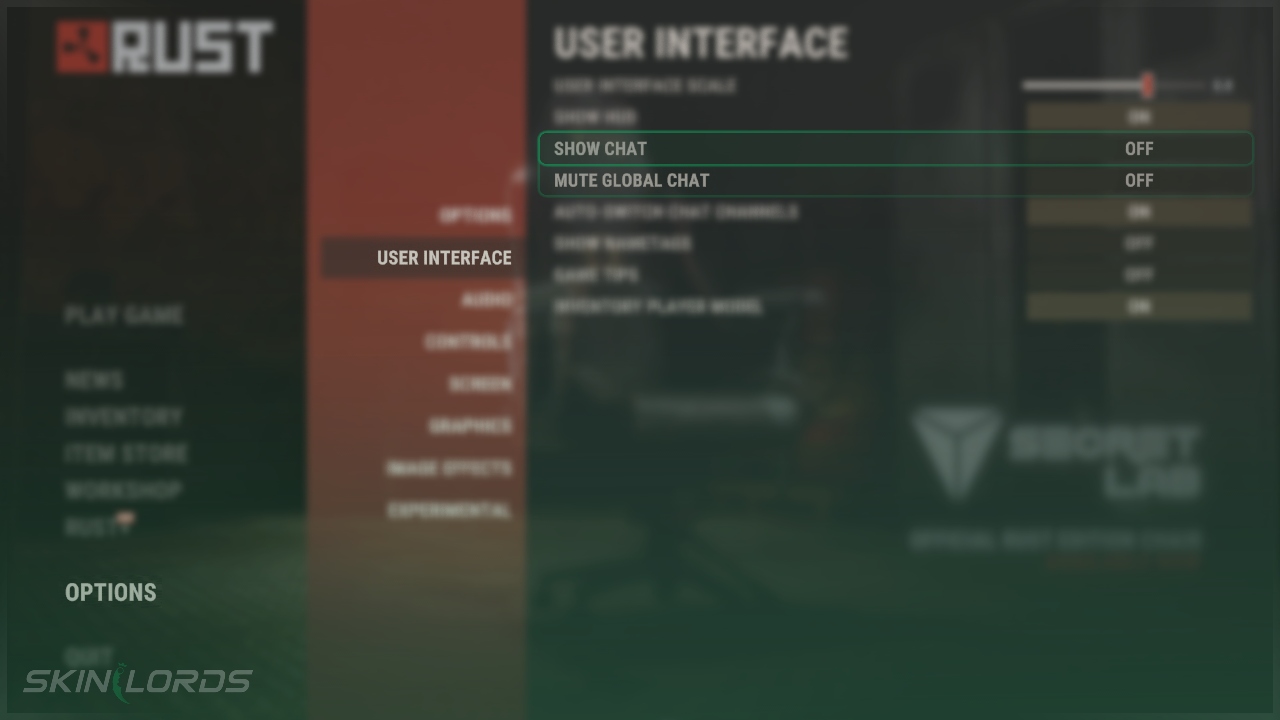
- Open Settings Menu and click on the User Interface page
- Under the User Interface settings, find Show Chat or Mute Global Chat
- Disabling Show Chat will altogether remove chat and all chat functions
- Enabling Mute Global Chat will remove global chat messages but keep team chat functions
We hope you found our guide on how to disable global chat or chat entirely in Rust to be helpful. If you have any questions or if you think we missed an important setting, please feel free to leave a comment.

Similar Articles
See all
Rust Guides
Rust Workbench Upgrades: Every Upgrade and How to Get Them
08.07.2026
0
31
Rust Guides

Rust Apartment Complex: How to Rent and Use Shops
08.07.2026
0
30
 Stake
Stake
Leave a reply